
UNT Helpdesk
The Information Technology Help Desk is here to provide technical support to students, faculty, staff, retirees, alumni, and visitors with timely, professional answers to your computing and information technology questions! Contact the Help Desk when you need assistance with password resets, new accounts, wireless, email, or other computing problems.
Service Alerts
Get an empty page after logging into the MFA Portal?
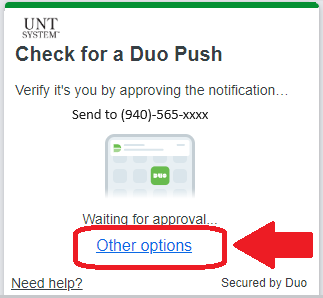
You might see an empty webpage after you login to the MFA portal. If you need to manage your devices but you get the blank page, go to this webpage AND CLICK "OTHER OPTIONS" in the prompt BEFORE YOU APPROVE MFA. https://aits.unt.edu/mfa-settings
Ongoing Intermittent Account Management System (ams.untsystem.edu outages) Outages
The Account Management System website is occasionally displaying a "Website Temporarily Unavailable" error message. The Helpdesk has reported this issue to our administrators, and they are actively working on stabilizing the service. If unavailable, please try again in 15 minutes.
Adobe Student Subscription Form Issues
The Helpdesk was notified regarding an issue accessing Adobe Subscriptions through the student access linked at adobe.unt.edu. Students are being told they are ineligible despite being registered for classes. Our administrators are aware of the issue and are actively working to resolve it.
Announcements
UNT/UNT System VPN Access to Require Duo MFA
Beginning Feb 29, 2024, the UNT VPN access will require Duo multi-factor authentication (MFA) in addition to your UNT account password. For more info on Duo MFA, visit our Duo MFA FAQ Page. Note: The DUO Mobile App is the default MFA method for VPN. See DUO Append Mode for alternate MFA methods.
This is a security enhancement to guard against password compromises to prevent unauthorized access to UNT VPN and the resources protected the VPN service. This security enhancement will reduce the risk to your UNT account and our data.
Duo Multi-Factor Authentication (MFA) Required for Staff Using PeopleSoft EIS (myUNT, myLS) starting June 9th, 2023
Notice: Effective June 9th, 2023, Duo Multi-Factor Authentication (MFA) will be required for all staff accessing Peoplesoft EIS due to compliance requirements with GLBA regulations. MFA adds an additional layer of protection to your account and safeguards sensitive data so only authorized individuals can access the system. To minimize disruptions to your workflow, our administrators have designed the MFA prompt to appear only once every 24 hours. Faculty and Students are excluded from this change, only staff accessing Peoplesoft EIS services like myUNT or myLS will be affected. For more info on Duo MFA, visit our Duo MFA FAQ Page.
UNT Anti-Virus Software
Starting in December, the UNT System is transitioning from McAfee anti-virus software to a new next-generation endpoint protection software called Crowdstrike Falcon. Your IT Support will manage this change for your work devices.
As part of this transition, the UNT System will no longer offer free licensed anti-virus software for personal devices. For personal devices, native anti-virus software such as Windows Defender or macOS XProtect are already included with newer operating systems.
Duo Multi-Factor Authentication (MFA)
Duo Multi-Factor Authentication (MFA) is here! Duo MFA helps protect your account from unauthorized access. Click here for information on how to set up Duo MFA.
Check out MyLab.unt.edu, UNT's new service for remote software access
Need access to university-licensed software? Try the new MyLab service to access over 150 UNT software titles all from your own computer! Visit https://mylab.unt.edu/ to learn more.
 ATTENTION! TikTok unavailable at UNT
 ATTENTION! TikTok unavailable at UNT
On December 7th, 2022, Governor Abbott issued an order calling for, among other actions, adding Network-based restrictions to prevent the use of TikTok on agency networks. As a state institution, UNT is required to adhere to this order, and has blocked access to the TikTok website on UNT networks.
Per Governor Abbott's order, all faculty and staff across UNT have been instructed to immediately cease using TikTok on any institutionally issued and/or managed devices. Additionally, social media managers at UNT have been asked to discontinue use of TikTok accounts immediately. Read Governor Abbott's order here for more information
STUDENTS can no longer access TikTok on personal devices if those devices are connected to the UNT network.
|
TikTok mobile app will not load |
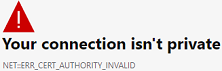 |
Browser will show an error message |
